Timesheet Request
The Timesheet Request screen allows you to request timesheets for a selected posting date for a list of employees. The request requires general documentation information about the timesheet, which includes the posting date, and a list of employees. Once the request is submitted, the Timesheet Request process creates a draft timesheet for each selected employee.
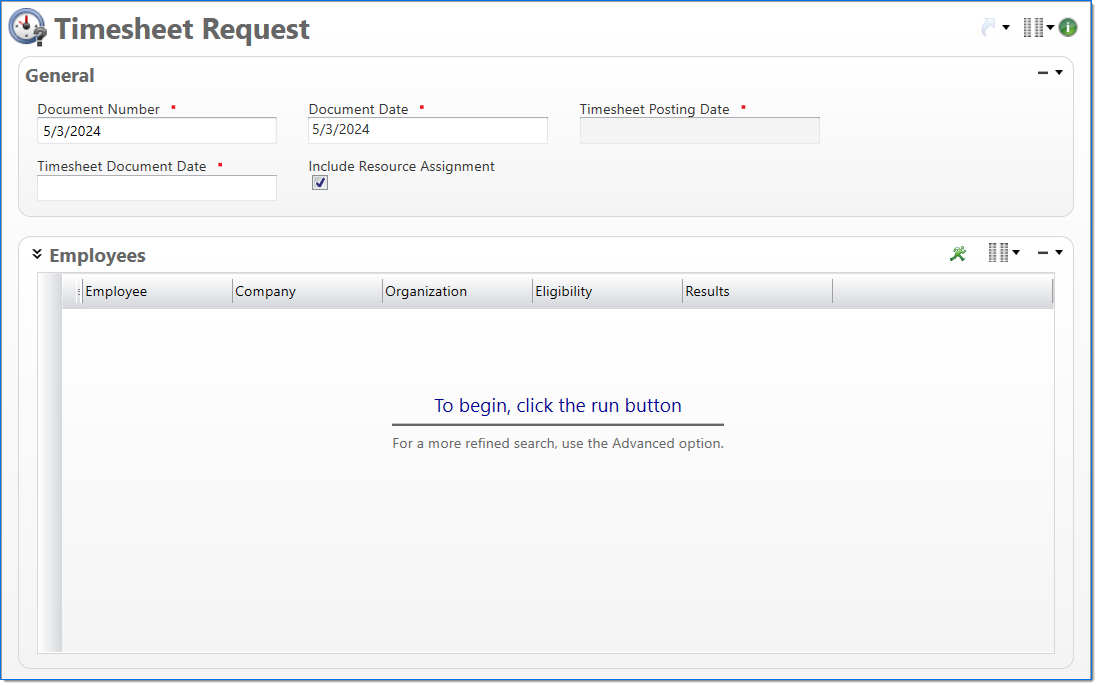
General
In the General area, enter general document information about the timesheet request.
| Field | Description | |
|---|---|---|

|
Document Number |
Enter a unique document number to identify this document. The default is the current date in the mm/dd/yyyy format. This field automatically prepopulates and be read-only if an auto-counter has been defined for this type of document. |
|
|
Document Date | Enter or select the document date. The default is the current date. |
|
|
Timesheet Posting Date | Enter or select the posting date. This date is used to associate the timesheet with a posting period. |
|
|
Timesheet Document Date | Enter or select a document date. This allows users to select transactions dates on the timesheet that do not belong to the selected posting date. |
| Include Resource Assignment | Select if published resource assignments with scheduled hours should be generated with the timesheets. | |
Employees
The Employees area allows you to search for and select a list of employees to generate timesheets for. Returned employees are limited to those that match any entered restrictions. For more information on restrictions, see Restrictions.
The default restriction fields are: Employee, Company, and Organization. Optional restriction fields are: Type, Time Type, and Employee Posting Group. Actual use of restrictions is optional. Use of no restriction values will generate draft timesheets for all eligible employees.
For information on how to search for employees or remove an employee from the list, see Add an Employee to a Timesheet Request.
Once employees have been added to the list, the following information is displayed for each employee.
| Field | Description | |
|---|---|---|
|
|
Employee | Displays the employee. |

|
Company | Displays the employee's company. |

|
Organization | Displays the employee's organization. |
|
|
Eligibility | Displays the employee's eligibility for a timesheet; options are Eligible or Ineligible. An employee is eligible for creation of a timesheet only if a timesheet does not already exist in draft or final for the employee / timesheet document date. |
|
|
Results | Displays the timing of the employee's appearance in the list. They either appeared as part of the Current Results or Previous Results. |
| Posting Group | Displays the employee's employee posting group. | |
| Time Type | Displays the employee's time type; options are Full Time or Part Time. | |
| Type | Displays the employee's type; options are Salaried or Hourly. | |