Account Map
The Account Map screen allows you to create hierarchical groups of accounts. Account maps are used on general ledger reports and financial statements to structure data.
For information on the steps necessary to create a map, see How to Create a Map.
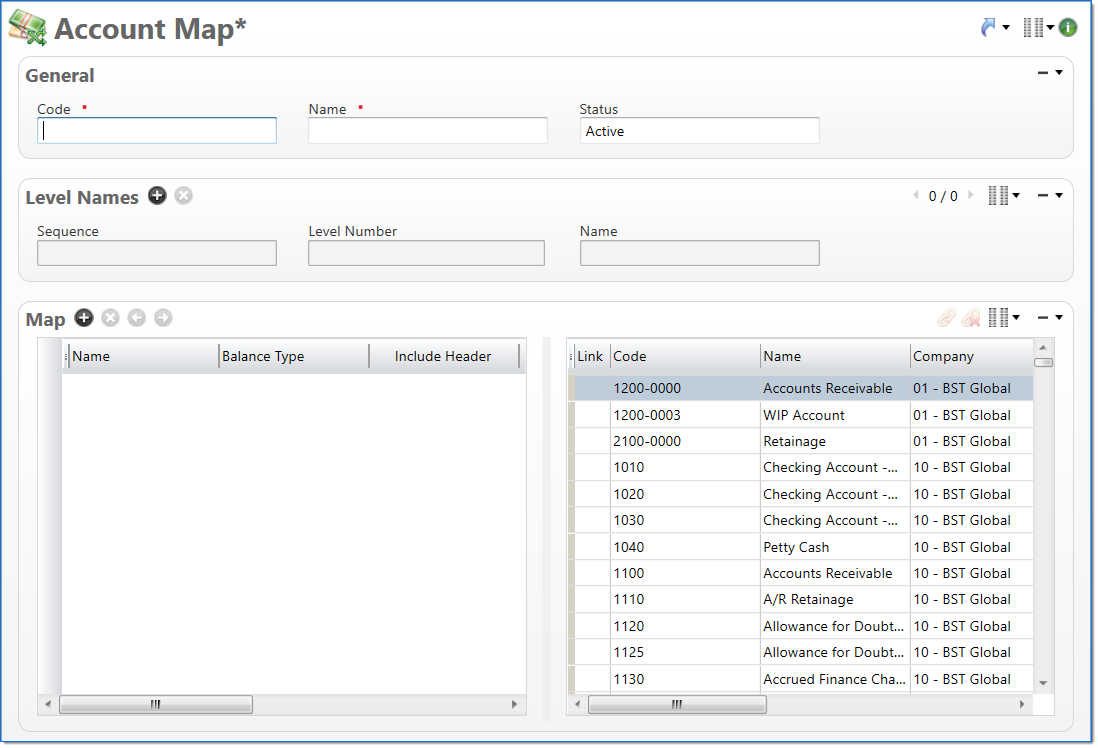
General
In the General area, enter account map information.
| Field | Description | |
|---|---|---|

|
Code | Enter a unique alphanumeric key to identify the document. Once a code has been entered and the document has been submitted to final, it typically cannot be changed. This code is the root node of the map. |
|
|
Name | Enter a name to describe the document. The name does not have to be unique. |
| Status |
Select the status of the document. |
|
Level Names
In the Level Names area, enter names to describe each level in the map hierarchy.
| Field | Description | |
|---|---|---|
|
|
Level Number | Enter or select the number of the map level. |
|
|
Name | Enter or select the name of the level number. |
Map
In the Map, enter the account map structure and then link accounts to map levels.
Map Structure
In the map structure list, define the map hierarchy.
| Field | Description | |
|---|---|---|
|
|
Name |
Enter a name for the map item. |
|
|
Balance Type | Select if the typical balance type of the map item is Credit or Debit. For example, asset type accounts will typically have a debit balance. |
|
|
Include Header | Select if the map item is included as a header when the account map is used in a report or query. |
|
|
Basis for % |
Select if the map item will be used as the basis for calculating percentages. This will be used when the Account Map is used in a report that calculates percentages. Only one map item can be used as the basis for the percent. |
| Level Name | Displays the level where the map item exists in the hierarchy. | |
| Level Number | Displays the name of the level. Level names are defined in the Level Names area and are based on the hierarchy level of the item in the list. | |
| Outliner | Displays the level outliner structure. | |

Accounts List
The Accounts list displays a list of all active accounts. This list is used to link accounts to a map item. Each account can be linked to a single map item that does not have any child map items. Accounts mapped to the structure can be from one or more companies. For more information, see Link Items to the Map Structure.