EDI Billing
EDI Billing allows Final Bill documents to be sent as an EDI (Electronic Data Interchange) format to a client. The EDI file may contain multiple Final Bill documents. This solution allows for the Final Bills to be extracted and transformed into a format that is suitable for the client. The EDI Format document allows you to set the type of output file being created and its folder. Currently transforms are available for Conoco Phillips (XML) and Exxon (CSV) but this solution is extendible, allowing other formats to be added as needed.

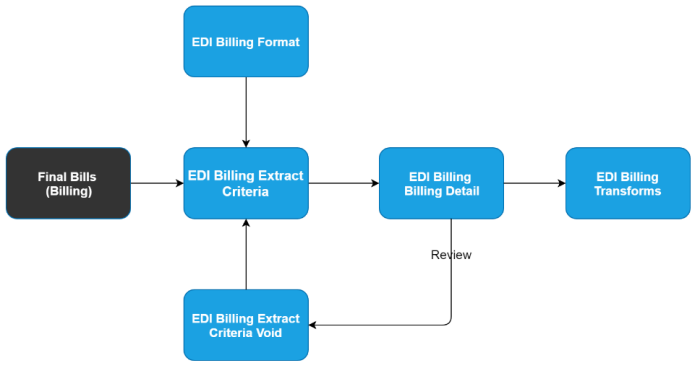
The following unique components handle the EDI process and are supported by internal extract and transform documents that produce output acceptable to your clients.
- EDI Billing Format: The format tool allows the design of EDI output structures and requirement to match client needs.
- EDI Billing Extract Criteria: The selection process that runs against Final Bills and uses the EDI Billing Format to extract and format the needed EDI output files.
- EDI Billing Extract Criteria Void: The document tool that allows previous EDI selections to be canceled.
Here is a typical sequence of events for EDI Billing for a billing cycle.
- The EDI Billing Extract Criteria process is run, and an output file generated and sent to the client.
- The EDI Billing file will be accepted or rejected by the client.
- If there are records (project / bill term / bill) within the file that are rejected, the Final Bill that was rejected will need to be voided and appropriate maintenance / correction done.
- The bills that have been voided and corrected will have new Final Bills run, and can be included in a new extract file generated for submission to the client.
- If an entire EDI Billing file needs to be re-extracted, the original EDI Billing Extract Criteria document must be voided and a new one created to select the correct project / bill term / bill for that new EDI Billing file.